Photo to Cartoon App
Explore the 24 AI photo styles in the Cartoon & Art Styles collection from Trendy AI Lab, including 3D Animated Movie, Anime Cel-Shaded, Comic Book and Claymation. Pick a style, upload a selfie, and create a share-worthy AI image in seconds with a plan on Android. The prompt for each style is free to copy.
Updated

AI prompt for 3D Animated Movie
- Copy the prompt
- Open your AI app
- Attach your photo and send
Redraw the person in my attached photo as the lead of a glossy 3D animated family film. Round soft features, big sparkling eyes with bright highlights, smooth skin with a gentle glow, and the same hairstyle and face shape so friends would still know it is me. Pose them mid-laugh in a warm sunlit storybook town with pastel rooftops and a blurred painted background, soft studio-style lighting, rich saturated colour. Vertical 9:16, one character only.
Prefer one tap with no pasting, and your face kept the same? Use the app.
The Cartoon & Art Styles collection turns your photo into world-class art styles, 3D animated movie, anime, comic book, pop art, claymation, pixel art, watercolor, cyberpunk, oil painting, ukiyo-e and more, each a completely different visual language while keeping your likeness.
- 20 distinct art styles, every one a different look
- From glossy 3D and anime to comic, pop-art, pixel, oil and cyberpunk
- Keeps your face recognisable in every style
Redraw the person in my attached photo as the lead of a glossy 3D animated family film. Round soft features, big sparkling eyes with bright highlights, smooth skin with a gentle glow, and the same hairstyle and face shape so friends would still know it is me. Pose them mid-laugh in a warm sunlit storybook town with pastel rooftops and a blurred painted background, soft studio-style lighting, rich saturated colour. Vertical 9:16, one character only.

Make me into a character from a modern anime series, using the attached selfie as the reference. Same face shape, hairstyle and skin tone, but drawn with clean cel shading, confident ink outlines, large glossy eyes with layered highlights and individual strands of hair catching the light. Stand them against a bright summer sky with drifting clouds and a few cherry petals, vivid saturated palette, slight wind in the hair. Vertical 9:16, looks like a real anime frame, not a photo filter.

Draw the person in the attached photo as the hero on a printed comic book page. Keep the face and hair recognisably theirs, but render it with thick black ink outlines, cross-hatched shadows, visible halftone dots and flat primary colours of red, yellow and blue. A confident low-angle pose over a city skyline at dusk, a bold burst shape behind the head, dramatic side light. Vertical 9:16, aged paper texture, no text or logos.

Rebuild the person in my attached photo as a handmade claymation figure. Same face shape, hairstyle and skin tone, sculpted from soft plasticine with visible thumbprints, tool marks and slightly chunky rounded proportions. Place them on a little tabletop set made of painted card and moss, lit by a warm studio lamp with a shallow depth of field, matte clay finish and a cheerful stop-motion expression. Vertical 9:16, one figure.

Convert me from the attached photo into a 16-bit pixel art character, as if I were the hero of an old arcade game. Keep my hair colour, skin tone, glasses or beard and main features readable in chunky square pixels with a limited bright palette, dithered shading and dark outlines. Stand me in a side-scrolling forest level with parallax hills, a glowing CRT feel and faint scanlines. Vertical 9:16, crisp pixels with no smoothing.

Paint the person in my attached photo as an illustration from a children's picture book. Their face and hair stay recognisable, rendered in loose watercolour washes with delicate pencil linework and soft bleeding edges. They sit in a meadow of wildflowers beside a small stream, warm late afternoon light, a pale cream paper texture showing through the colour, a gentle nostalgic mood. Vertical 9:16, muted pastels, no text.

Draw me, from the attached photo, as a 1930s rubber-hose cartoon character. Keep my hairstyle and the main features of my face, but give me noodle-thin bendy arms and legs, pie-cut eyes, white gloves and bold simple inking. Black and white with a warm sepia tint, old film grain, flickering vignette and a few scratches, dancing on a simple barn stage with a bouncing beat. Vertical 9:16, one character.

Turn my attached photo into a 1960s style screen-print pop art portrait. My face stays recognisable, simplified into flat blocks of hot pink, turquoise, yellow and black with a heavy outline and coarse halftone dots in the shadows. Hard-edged posterised shading, a plain bright coloured background, and slight misregistration between the colour layers like a real print run. Vertical 9:16, looks like a gallery poster, no lettering.

Make the person in the attached photo into a character from a modern flat-vector TV cartoon. Their face, hairstyle and skin tone stay recognisable, but simplified with thick clean outlines, solid colour fills, minimal shading and slightly exaggerated proportions. Show them waving in front of a bright, simple suburban street with a blue sky and a couple of round trees, cheerful palette, no gradients. Vertical 9:16, graphic and clean like an animation cel.

Sculpt a playful 3D caricature of the person in my attached photo. The head is much bigger than the body, with the same distinctive features pushed further for fun: the real nose, smile, hair and eyebrows exaggerated but obviously mine. Semi-realistic skin with pores, a big friendly grin, a tiny body in my usual clothes, glossy studio lighting against a plain pastel backdrop. Vertical 9:16, funny but kind, one figure.

Redraw me from the attached selfie as a page from a black and white manga. Same face and hairstyle, with sharp ink linework, screentone dot shading, big expressive eyes and dramatic speed lines radiating behind me as I look back over my shoulder. Strict monochrome, high contrast, a rooftop at sunset suggested with a few tone patterns and a flock of birds. Vertical 9:16, panel border visible, no speech bubbles or text.

Place the person in my attached photo in a rain-soaked cyberpunk city at night. Their face stays exactly recognisable while magenta and cyan neon light rakes across one cheek, with wet reflections on a dark jacket with a faint holographic trim. Behind, out-of-focus signs in invented lettering, steam from a street vent and glowing puddles, shot like an 85mm portrait. Vertical 9:16, moody and cinematic, no readable brand names.

Reimagine the person in my attached photo as a traditional Japanese woodblock print. Keep their hairstyle and the main features of the face, drawn with flowing carved outlines, flat muted pigments in indigo, vermilion and ochre, and visible wood grain in the paper. Seat them in a kimono-style robe beside a great stylised wave and drifting clouds, with a simple red seal in the corner and no readable writing. Vertical 9:16.

Paint me from the attached photo as an old-master oil portrait. My face stays true to the photo, set in deep warm shadow with soft chiaroscuro light from a window at the left, dark velvet clothing with a white collar and a muted brown-green background. Visible brushstrokes, craquelure on the canvas, hands folded calmly, a dignified quiet expression. Vertical 9:16, looks like a museum canvas in a plain gilded frame.

Draw the person in the attached photo as a hand-made graphite pencil sketch. Same face and hairstyle, captured with confident clean contour lines, soft smudged shading on the cheeks and fine cross-hatching in the hair and collar. Monochrome grey on cream sketchbook paper with a few loose construction lines, an eraser smudge and the edge of the page visible. Vertical 9:16, head and shoulders, no colour.

Put me, from the attached photo, inside a retro 80s vaporwave poster. My face stays recognisable, lit with pink and cyan gradient glow and a glossy chrome sheen on the sunglasses and jacket. Behind me a flat striped sunset over a glowing neon grid, palm silhouettes and a floating marble bust, with soft VHS scanlines across the frame. Vertical 9:16, dreamy and nostalgic, no text.

Turn the person in my attached photo into a stained glass window. Their face and hair stay recognisable, built from jewel-coloured glass panels separated by thick black lead lines, lit from behind so the ruby, sapphire and amber pieces glow. Add a symmetrical ornamental border of leaves and flowers, a cathedral window arch and slight texture in the glass. Vertical 9:16, flat and luminous, no lettering.

Paint the person in my attached photo as a giant street art mural on a brick wall. Keep the face and hairstyle recognisable in layered spray paint with crisp stencil edges, glossy highlights, a few honest drips and splatter around the head. Gritty alley setting with peeling posters, a metal shutter and warm afternoon light. Vertical 9:16, bold colours of orange, teal and magenta, no readable tags or brand names.

Create character art of me from the attached photo as a hero in a fantasy role-playing game. Keep my face and hair true to the photo, then dress me in layered leather and engraved steel armour with a travel cloak, a sword at the hip and glowing blue sparks drifting around my raised hand. Misty mountain pass at dawn, painterly digital illustration, dramatic rim light. Vertical 9:16, three-quarter pose.

Rebuild the person in my attached photo as a low-poly 3D sculpture. The face stays recognisable, made from flat triangular facets with smooth colour gradients across them, each plane catching the light differently. Soft studio lighting, a clean gradient backdrop in teal and coral, minimal geometric shoulders and a few floating polygon shards. Vertical 9:16, crisp edges, no textures or text.

Design a phone wallpaper collage from the attached photo. Use several crops of me, a large hero portrait looking up past the camera, a profile, a tight crop of the eyes and a hand touching my face, as torn-edge printed photos overlapping on a dark moody background with real lilies and a small handwritten note tucked between them. Keep my face consistent in every crop. Layout: [torn paper stack, or a music player card floating over the portrait]. Vertical 9:16, no song titles.

Turn the person in my attached photo into a wayang kulit shadow puppet figure. Keep a recognisable profile and hair shape, with a long slender body, pierced leather lacework and gold leaf detailing. Composition: [as a silhouette behind the lit kelir screen, or on aged parchment, or inside a gunungan frame]. Palette: [gold leaf on deep black]. A lamp flame flickering behind, fine perforations casting tiny light dots. Vertical 9:16, respectful, traditional.

Draw me, from the attached photo, as a soft storybook cartoon child-like character with a small round fluffy companion creature of its own invention. Keep my face and hair recognisable. Scene: [sitting under a cherry tree watching a shooting star, or standing in a rainy puddle with little rubber ducks, or lying in summer grass watching clouds]. Gentle pastel colours, warm light, tiny details like petals and fireflies. Vertical 9:16, no text.

Render the person in my attached photo as a hand-drawn batik tulis artwork on cloth. Keep their face and hair recognisable, drawn with fine flowing canting wax lines and traditional dyes, with crackle veins where the wax cracked. Palette: [classic indigo and cream]. Surround them with a border of [parang diagonal motif] and small floral fillers. A visible cloth weave, slight dye bleed at the edges, calm dignified pose. Vertical 9:16.


Next festivals to make photos for
All 24 styles in Cartoon & Art Styles
Every style here returns a tall 9:16 image, sized to fill a phone screen and works from one photo.
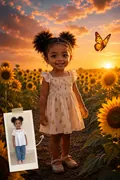
3D Animated Movie
The glossy, big-eyed CGI look of an animated feature, with your likeness kept intact.
Redraw the person in my attached photo as the lead of a glossy 3D animated family film.
Get the AI prompt for 3D Animated Movie
- Copy the prompt
- Open your AI app
- Attach your photo and send
Redraw the person in my attached photo as the lead of a glossy 3D animated family film. Round soft features, big sparkling eyes with bright highlights, smooth skin with a gentle glow, and the same hairstyle and face shape so friends would still know it is me. Pose them mid-laugh in a warm sunlit storybook town with pastel rooftops and a blurred painted background, soft studio-style lighting, rich saturated colour. Vertical 9:16, one character only.
Prefer one tap with no pasting, and your face kept the same? Use the app.
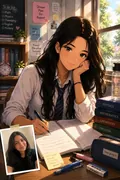
Anime Cel-Shaded
Clean cel shading, confident linework and glossy eyes. Straight anime, not a filter.
Make me into a character from a modern anime series, using the attached selfie as the reference.
Get the AI prompt for Anime Cel-Shaded
- Copy the prompt
- Open your AI app
- Attach your photo and send
Make me into a character from a modern anime series, using the attached selfie as the reference. Same face shape, hairstyle and skin tone, but drawn with clean cel shading, confident ink outlines, large glossy eyes with layered highlights and individual strands of hair catching the light. Stand them against a bright summer sky with drifting clouds and a few cherry petals, vivid saturated palette, slight wind in the hair. Vertical 9:16, looks like a real anime frame, not a photo filter.
Prefer one tap with no pasting, and your face kept the same? Use the app.
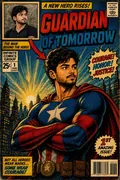
Comic Book
Heavy ink outlines and halftone dots, printed like a page pulled from a comic.
Draw the person in the attached photo as the hero on a printed comic book page.
Get the AI prompt for Comic Book
- Copy the prompt
- Open your AI app
- Attach your photo and send
Draw the person in the attached photo as the hero on a printed comic book page. Keep the face and hair recognisably theirs, but render it with thick black ink outlines, cross-hatched shadows, visible halftone dots and flat primary colours of red, yellow and blue. A confident low-angle pose over a city skyline at dusk, a bold burst shape behind the head, dramatic side light. Vertical 9:16, aged paper texture, no text or logos.
Prefer one tap with no pasting, and your face kept the same? Use the app.
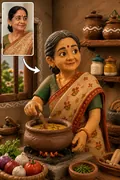
Claymation
Sculpted in plasticine by hand, complete with the fingerprints stop-motion leaves behind.
Rebuild the person in my attached photo as a handmade claymation figure.
Get the AI prompt for Claymation
- Copy the prompt
- Open your AI app
- Attach your photo and send
Rebuild the person in my attached photo as a handmade claymation figure. Same face shape, hairstyle and skin tone, sculpted from soft plasticine with visible thumbprints, tool marks and slightly chunky rounded proportions. Place them on a little tabletop set made of painted card and moss, lit by a warm studio lamp with a shallow depth of field, matte clay finish and a cheerful stop-motion expression. Vertical 9:16, one figure.
Prefer one tap with no pasting, and your face kept the same? Use the app.
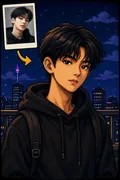
Pixel Art
Crisp 16-bit sprite work, the kind that used to fit on a cartridge.
Convert me from the attached photo into a 16-bit pixel art character, as if I were the hero of an old arcade game.
Get the AI prompt for Pixel Art
- Copy the prompt
- Open your AI app
- Attach your photo and send
Convert me from the attached photo into a 16-bit pixel art character, as if I were the hero of an old arcade game. Keep my hair colour, skin tone, glasses or beard and main features readable in chunky square pixels with a limited bright palette, dithered shading and dark outlines. Stand me in a side-scrolling forest level with parallax hills, a glowing CRT feel and faint scanlines. Vertical 9:16, crisp pixels with no smoothing.
Prefer one tap with no pasting, and your face kept the same? Use the app.
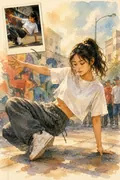
Watercolor Storybook
Soft washes and painterly edges, drawn the way a children's book is drawn.
Paint the person in my attached photo as an illustration from a children's picture book.
Get the AI prompt for Watercolor Storybook
- Copy the prompt
- Open your AI app
- Attach your photo and send
Paint the person in my attached photo as an illustration from a children's picture book. Their face and hair stay recognisable, rendered in loose watercolour washes with delicate pencil linework and soft bleeding edges. They sit in a meadow of wildflowers beside a small stream, warm late afternoon light, a pale cream paper texture showing through the colour, a gentle nostalgic mood. Vertical 9:16, muted pastels, no text.
Prefer one tap with no pasting, and your face kept the same? Use the app.
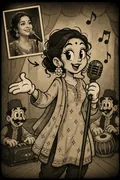
Vintage Toon
1930s rubber-hose animation in black and white, bendy limbs and all.
Draw me, from the attached photo, as a 1930s rubber-hose cartoon character.
Get the AI prompt for Vintage Toon
- Copy the prompt
- Open your AI app
- Attach your photo and send
Draw me, from the attached photo, as a 1930s rubber-hose cartoon character. Keep my hairstyle and the main features of my face, but give me noodle-thin bendy arms and legs, pie-cut eyes, white gloves and bold simple inking. Black and white with a warm sepia tint, old film grain, flickering vignette and a few scratches, dancing on a simple barn stage with a bouncing beat. Vertical 9:16, one character.
Prefer one tap with no pasting, and your face kept the same? Use the app.
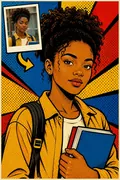
Pop Art
Flat blocks of colour and screen-print halftones, in the gallery-poster tradition.
Turn my attached photo into a 1960s style screen-print pop art portrait.
Get the AI prompt for Pop Art
- Copy the prompt
- Open your AI app
- Attach your photo and send
Turn my attached photo into a 1960s style screen-print pop art portrait. My face stays recognisable, simplified into flat blocks of hot pink, turquoise, yellow and black with a heavy outline and coarse halftone dots in the shadows. Hard-edged posterised shading, a plain bright coloured background, and slight misregistration between the colour layers like a real print run. Vertical 9:16, looks like a gallery poster, no lettering.
Prefer one tap with no pasting, and your face kept the same? Use the app.
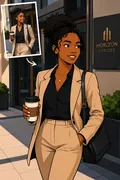
Flat Cartoon
Bold outlines, flat fills, and the clean look of a TV animation cel.
Make the person in the attached photo into a character from a modern flat-vector TV cartoon.
Get the AI prompt for Flat Cartoon
- Copy the prompt
- Open your AI app
- Attach your photo and send
Make the person in the attached photo into a character from a modern flat-vector TV cartoon. Their face, hairstyle and skin tone stay recognisable, but simplified with thick clean outlines, solid colour fills, minimal shading and slightly exaggerated proportions. Show them waving in front of a bright, simple suburban street with a blue sky and a couple of round trees, cheerful palette, no gradients. Vertical 9:16, graphic and clean like an animation cel.
Prefer one tap with no pasting, and your face kept the same? Use the app.

3D Caricature
Features pushed for comedy and sculpted in 3D, while still recognisably you.
Sculpt a playful 3D caricature of the person in my attached photo.
Get the AI prompt for 3D Caricature
- Copy the prompt
- Open your AI app
- Attach your photo and send
Sculpt a playful 3D caricature of the person in my attached photo. The head is much bigger than the body, with the same distinctive features pushed further for fun: the real nose, smile, hair and eyebrows exaggerated but obviously mine. Semi-realistic skin with pores, a big friendly grin, a tiny body in my usual clothes, glossy studio lighting against a plain pastel backdrop. Vertical 9:16, funny but kind, one figure.
Prefer one tap with no pasting, and your face kept the same? Use the app.
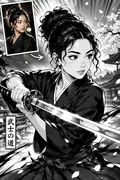
Manga
Sharp ink and screentone shading, laid out like a manga panel.
Redraw me from the attached selfie as a page from a black and white manga.
Get the AI prompt for Manga
- Copy the prompt
- Open your AI app
- Attach your photo and send
Redraw me from the attached selfie as a page from a black and white manga. Same face and hairstyle, with sharp ink linework, screentone dot shading, big expressive eyes and dramatic speed lines radiating behind me as I look back over my shoulder. Strict monochrome, high contrast, a rooftop at sunset suggested with a few tone patterns and a flock of birds. Vertical 9:16, panel border visible, no speech bubbles or text.
Prefer one tap with no pasting, and your face kept the same? Use the app.
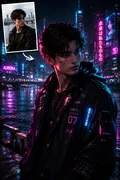
Cyberpunk Neon
Neon bleeding across rain-slick streets, with the glow catching the side of your face.
Place the person in my attached photo in a rain-soaked cyberpunk city at night.
Get the AI prompt for Cyberpunk Neon
- Copy the prompt
- Open your AI app
- Attach your photo and send
Place the person in my attached photo in a rain-soaked cyberpunk city at night. Their face stays exactly recognisable while magenta and cyan neon light rakes across one cheek, with wet reflections on a dark jacket with a faint holographic trim. Behind, out-of-focus signs in invented lettering, steam from a street vent and glowing puddles, shot like an 85mm portrait. Vertical 9:16, moody and cinematic, no readable brand names.
Prefer one tap with no pasting, and your face kept the same? Use the app.
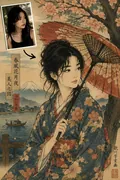
Ukiyo-e Woodblock
Flowing carved lines and flat colour, printed the way a woodblock print is printed.
Reimagine the person in my attached photo as a traditional Japanese woodblock print.
Get the AI prompt for Ukiyo-e Woodblock
- Copy the prompt
- Open your AI app
- Attach your photo and send
Reimagine the person in my attached photo as a traditional Japanese woodblock print. Keep their hairstyle and the main features of the face, drawn with flowing carved outlines, flat muted pigments in indigo, vermilion and ochre, and visible wood grain in the paper. Seat them in a kimono-style robe beside a great stylised wave and drifting clouds, with a simple red seal in the corner and no readable writing. Vertical 9:16.
Prefer one tap with no pasting, and your face kept the same? Use the app.
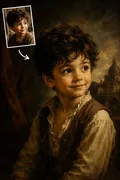
Oil Painting
Renaissance brushwork and deep, warm light, painted onto canvas.
Paint me from the attached photo as an old-master oil portrait.
Get the AI prompt for Oil Painting
- Copy the prompt
- Open your AI app
- Attach your photo and send
Paint me from the attached photo as an old-master oil portrait. My face stays true to the photo, set in deep warm shadow with soft chiaroscuro light from a window at the left, dark velvet clothing with a white collar and a muted brown-green background. Visible brushstrokes, craquelure on the canvas, hands folded calmly, a dignified quiet expression. Vertical 9:16, looks like a museum canvas in a plain gilded frame.
Prefer one tap with no pasting, and your face kept the same? Use the app.
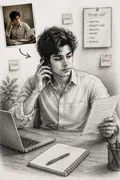
Pencil Sketch
Clean linework and soft graphite shading, drawn as if by hand.
Draw the person in the attached photo as a hand-made graphite pencil sketch.
Get the AI prompt for Pencil Sketch
- Copy the prompt
- Open your AI app
- Attach your photo and send
Draw the person in the attached photo as a hand-made graphite pencil sketch. Same face and hairstyle, captured with confident clean contour lines, soft smudged shading on the cheeks and fine cross-hatching in the hair and collar. Monochrome grey on cream sketchbook paper with a few loose construction lines, an eraser smudge and the edge of the page visible. Vertical 9:16, head and shoulders, no colour.
Prefer one tap with no pasting, and your face kept the same? Use the app.
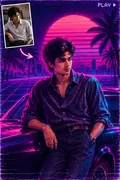
Vaporwave 80s
Pink and cyan glow, chrome type and the flat sun of an 80s cassette insert.
Put me, from the attached photo, inside a retro 80s vaporwave poster.
Get the AI prompt for Vaporwave 80s
- Copy the prompt
- Open your AI app
- Attach your photo and send
Put me, from the attached photo, inside a retro 80s vaporwave poster. My face stays recognisable, lit with pink and cyan gradient glow and a glossy chrome sheen on the sunglasses and jacket. Behind me a flat striped sunset over a glowing neon grid, palm silhouettes and a floating marble bust, with soft VHS scanlines across the frame. Vertical 9:16, dreamy and nostalgic, no text.
Prefer one tap with no pasting, and your face kept the same? Use the app.
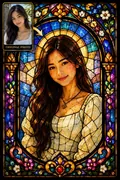
Stained Glass
Glass panels lit from behind and held together by dark lead lines.
Turn the person in my attached photo into a stained glass window.
Get the AI prompt for Stained Glass
- Copy the prompt
- Open your AI app
- Attach your photo and send
Turn the person in my attached photo into a stained glass window. Their face and hair stay recognisable, built from jewel-coloured glass panels separated by thick black lead lines, lit from behind so the ruby, sapphire and amber pieces glow. Add a symmetrical ornamental border of leaves and flowers, a cathedral window arch and slight texture in the glass. Vertical 9:16, flat and luminous, no lettering.
Prefer one tap with no pasting, and your face kept the same? Use the app.
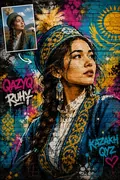
Graffiti Street Art
Spray paint, honest drips and hard stencil edges, put up as a wall mural.
Paint the person in my attached photo as a giant street art mural on a brick wall.
Get the AI prompt for Graffiti Street Art
- Copy the prompt
- Open your AI app
- Attach your photo and send
Paint the person in my attached photo as a giant street art mural on a brick wall. Keep the face and hairstyle recognisable in layered spray paint with crisp stencil edges, glossy highlights, a few honest drips and splatter around the head. Gritty alley setting with peeling posters, a metal shutter and warm afternoon light. Vertical 9:16, bold colours of orange, teal and magenta, no readable tags or brand names.
Prefer one tap with no pasting, and your face kept the same? Use the app.
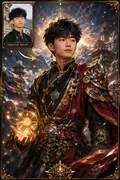
Fantasy RPG Art
Painterly armour and magical light, in the style of an RPG character sheet.
Create character art of me from the attached photo as a hero in a fantasy role-playing game.
Get the AI prompt for Fantasy RPG Art
- Copy the prompt
- Open your AI app
- Attach your photo and send
Create character art of me from the attached photo as a hero in a fantasy role-playing game. Keep my face and hair true to the photo, then dress me in layered leather and engraved steel armour with a travel cloak, a sword at the hip and glowing blue sparks drifting around my raised hand. Misty mountain pass at dawn, painterly digital illustration, dramatic rim light. Vertical 9:16, three-quarter pose.
Prefer one tap with no pasting, and your face kept the same? Use the app.
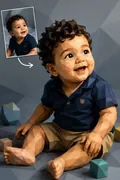
Low-Poly 3D
Faceted geometry and clean gradients, built from as few polygons as possible.
Rebuild the person in my attached photo as a low-poly 3D sculpture.
Get the AI prompt for Low-Poly 3D
- Copy the prompt
- Open your AI app
- Attach your photo and send
Rebuild the person in my attached photo as a low-poly 3D sculpture. The face stays recognisable, made from flat triangular facets with smooth colour gradients across them, each plane catching the light differently. Soft studio lighting, a clean gradient backdrop in teal and coral, minimal geometric shoulders and a few floating polygon shards. Vertical 9:16, crisp edges, no textures or text.
Prefer one tap with no pasting, and your face kept the same? Use the app.
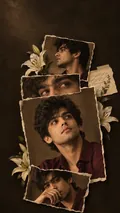
Aesthetic Collage
Torn paper prints and sliced strips layered up, with a music player floating over the top.
Options: Layout.
Design a phone wallpaper collage from the attached photo.
Get the AI prompt for Aesthetic Collage
- Copy the prompt
- Open your AI app
- Attach your photo and send
Design a phone wallpaper collage from the attached photo. Use several crops of me, a large hero portrait looking up past the camera, a profile, a tight crop of the eyes and a hand touching my face, as torn-edge printed photos overlapping on a dark moody background with real lilies and a small handwritten note tucked between them. Keep my face consistent in every crop. Layout: [torn paper stack, or a music player card floating over the portrait]. Vertical 9:16, no song titles.
Prefer one tap with no pasting, and your face kept the same? Use the app.
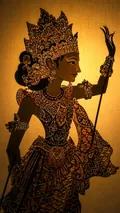
Wayang Shadow Art
Pierced leather silhouettes, gold leaf and the flicker of the lamp behind.
Options: Composition, Palette.
Turn the person in my attached photo into a wayang kulit shadow puppet figure.
Get the AI prompt for Wayang Shadow Art
- Copy the prompt
- Open your AI app
- Attach your photo and send
Turn the person in my attached photo into a wayang kulit shadow puppet figure. Keep a recognisable profile and hair shape, with a long slender body, pierced leather lacework and gold leaf detailing. Composition: [as a silhouette behind the lit kelir screen, or on aged parchment, or inside a gunungan frame]. Palette: [gold leaf on deep black]. A lamp flame flickering behind, fine perforations casting tiny light dots. Vertical 9:16, respectful, traditional.
Prefer one tap with no pasting, and your face kept the same? Use the app.
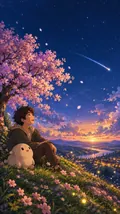
Storybook Buddy
You and a small round companion under shooting stars, out in the rain, or sat on a picnic blanket.
Options: Scene.
Draw me, from the attached photo, as a soft storybook cartoon child-like character with a small round fluffy companion creature of its own invention.
Get the AI prompt for Storybook Buddy
- Copy the prompt
- Open your AI app
- Attach your photo and send
Draw me, from the attached photo, as a soft storybook cartoon child-like character with a small round fluffy companion creature of its own invention. Keep my face and hair recognisable. Scene: [sitting under a cherry tree watching a shooting star, or standing in a rainy puddle with little rubber ducks, or lying in summer grass watching clouds]. Gentle pastel colours, warm light, tiny details like petals and fireflies. Vertical 9:16, no text.
Prefer one tap with no pasting, and your face kept the same? Use the app.
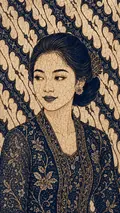
Batik Tulis Art
Flowing canting wax lines and traditional dyes, drawn rather than printed.
Options: Palette, Batik motif.
Render the person in my attached photo as a hand-drawn batik tulis artwork on cloth.
Get the AI prompt for Batik Tulis Art
- Copy the prompt
- Open your AI app
- Attach your photo and send
Render the person in my attached photo as a hand-drawn batik tulis artwork on cloth. Keep their face and hair recognisable, drawn with fine flowing canting wax lines and traditional dyes, with crackle veins where the wax cracked. Palette: [classic indigo and cream]. Surround them with a border of [parang diagonal motif] and small floral fillers. A visible cloth weave, slight dye bleed at the edges, calm dignified pose. Vertical 9:16.
Prefer one tap with no pasting, and your face kept the same? Use the app.
How to use these prompts in Gemini (Nano Banana) or ChatGPT
- Pick a prompt above and tap Copy prompt, or Open in Gemini to copy and open it in one go.
- In Gemini or ChatGPT, attach a clear photo of your face (or of everyone in the picture).
- Paste the prompt, fill in anything in [brackets], and send.
- Not quite right? Reply with one change, such as "warmer light" or "keep my face exactly the same".
From selfie to Cartoon & Art Styles in three taps
Pick a style
Choose a look from the Cartoon & Art Styles collection above. No editing skill needed.
Upload a photo
Add a clear, well-lit selfie. It is used only to make your image and is deleted afterward.
Generate and share
Your AI photo is ready in seconds to download or share anywhere.
Tips for the best result
Use a clear, front-facing selfie in good light so your features translate cleanly into each art style.
Why one photo, many art styles is so much fun
Most photo edits give you a filter. This collection gives you a whole visual language. Trendy AI Lab and its Cartoon & Art Styles set take a single selfie and rebuild it as world-class artwork, and the joy is in the range: the same face can be a glossy animated hero one minute and a woodblock print the next. Because every style is a genuinely different medium rather than a colour tweak, one photo can turn into a small gallery, and you stay recognisable in all of it.
A closer look at the styles
The collection runs to twenty distinct looks, and they are deliberately spread across very different traditions. On the polished end there is 3D animated movie art, that smooth, big-studio character finish, alongside anime for clean lines and expressive eyes. The illustrated side brings comic book panels with inked outlines and pop art with its bold blocks and dots. For texture and craft, there is soft claymation, chunky retro pixel art, and delicate watercolour that lets the paper breathe.
Then the set reaches into fine art and mood. Oil painting gives you rich, brushed depth like a classical portrait. Ukiyo-e brings the flat colour and flowing line of Japanese woodblock prints. And cyberpunk swings the other way entirely, neon-lit, high-contrast, near-future. Each of these is a completely different world, which is the point: you are not choosing a stronger or weaker filter, you are choosing a medium. Through all of it, your likeness is preserved, so friends still see you inside the artwork.
Ideas and occasions
Because the styles are so varied, they suit almost any use. Build a profile-picture rotation: an anime version for one app, a comic-panel one for another, a painterly one for something more formal. Post a before-and-after that shows your real photo beside three or four styles, which always reads well as a story or status. Turn a favourite selfie into a gift, an oil-painting portrait for a parent, a pixel-art avatar for a gamer friend. Make matching sets with friends or family in one shared style for a group banner. They also work beautifully for birthday and celebration posts, for couple or friendship keepsakes, and as eye-catching art to print when a single style really lands.
Getting the best result
- Start with a clear, front-facing selfie in good light. Clean features translate more faithfully into each medium, so you stay recognisable whether the look is anime or oil paint.
- Sample across the extremes first. Try one polished style like 3D or anime and one textured style like watercolour or ukiyo-e. Seeing the range helps you find which medium flatters your photo most.
- Remember each style is a different language, so a photo that looks incredible as cyberpunk may look softer as watercolour. That is expected, and part of the fun is discovering which suits you.
- If a style loses your features or leans too abstract, regenerate. Each run interprets the art fresh, so a second pass often keeps your likeness sharper while holding the style.
Pick a style, upload one selfie, and watch yourself become a different work of art. The prompt is free to copy, and a plan lets you make it in the app.
Cartoon & Art Styles: photos, prompts and plans explained
Will I still look like me in these art styles?
Yes. Every style keeps your face recognisable. The medium around it changes completely, from brushstrokes to pixels to ink, but your likeness carries through so people still know it is you.
How different are the twenty styles, really?
Genuinely different. These are separate art forms, not variations of one filter, so 3D animation, comic, pop art, pixel, watercolour, oil, ukiyo-e and cyberpunk each give you a distinct result from the same photo.
Can I make a matching set with friends?
Absolutely. Have everyone run the same style with their own selfie and you get a coordinated group, ideal for a shared banner, a family post, or a friends collage.
How do I make a photo from the Cartoon & Art Styles collection?
Open the Trendy AI Lab app, pick a style from the Cartoon & Art Styles collection, upload a photo, and the app generates your image in seconds. You can then download or share it.
What photo works best for Cartoon & Art Styles?
Use a clear, front-facing selfie in good light so your features translate cleanly into each art style.
Is Trendy AI Lab free?
The prompt for every style is free: copy it into ChatGPT or Gemini. Making the image in the app, with your face kept the same, needs a weekly or monthly plan, and the browser image tools are free with no account.
Which platforms is it available on?
The image tools work in any browser, on phone or desktop. The AI trends are in the Android app, with the iOS version coming soon.
How is my photo used?
Your photo is sent to a third-party AI service only to generate your image, and the upload is deleted afterwards. It is never used for advertising.
Make yours from the Cartoon & Art Styles collection
Copy a free prompt for any style here, or make it with your own face in the Trendy AI Lab app.

 Coming soon