AI USA Travel Photo Maker
Explore the 14 AI photo styles in the World Cities & Landmarks collection from Trendy AI Lab, including Statue of Liberty Sunrise, New York Times Square, Golden Gate Bridge and Los Angeles Boulevard. Pick a style, upload a selfie, and create a share-worthy AI image in seconds with a plan on Android. The prompt for each style is free to copy.
Updated

AI prompt for Statue of Liberty Sunrise
- Copy the prompt
- Open your AI app
- Attach your photo and send
Place me, from the attached photo, on the harbour at sunrise with the Statue of Liberty across flat water and the Manhattan skyline catching the first light, in a casual jacket with the wind in my hair. Keep my face the same. A pink and gold sky, gentle haze, a 35mm travel photo look. Vertical 9:16.
Prefer one tap with no pasting, and your face kept the same? Use the app.
The World Cities & Landmarks collection turns your selfie into AI travel photos at famous city landmarks, the Statue of Liberty, Times Square, the Golden Gate Bridge, Las Vegas, Miami, Honolulu and more.
- Travel photos at iconic city landmarks from one selfie
- New York, LA, Vegas, SF and Miami looks to choose from
- Cinematic travel photography styling built in
Place me, from the attached photo, on the harbour at sunrise with the Statue of Liberty across flat water and the Manhattan skyline catching the first light, in a casual jacket with the wind in my hair. Keep my face the same. A pink and gold sky, gentle haze, a 35mm travel photo look. Vertical 9:16.

From my attached photo, put me in Times Square at night, standing among yellow cabs and crowds under huge billboards, with rain on the road reflecting red and blue light. Keep my face exactly as is. A dark trench coat and an umbrella, steam rising from a street grate, cinematic street photography at 35mm. Vertical 9:16.

Stand me on a coastal path above the bay with the Golden Gate Bridge rising through morning fog and the sun just breaking through. Use my attached photo and keep my face unchanged. A windbreaker and jeans, cool soft light, the orange bridge against pale grey, long lens compression. Vertical 9:16. Damp air beads on my sleeves, gulls cross the fog, and the bay below is just visible.

Show me on a palm lined Los Angeles boulevard at golden hour, leaning against a classic convertible, with hazy mountains at the end of the street. Use the attached photo, keeping my face exactly as photographed. Sunglasses pushed up, light summer clothes, a warm lens flare, 50mm lens. Vertical 9:16.

Using my attached photo, place me on the Las Vegas Strip at night in a sharp jacket, with blazing signs and neon streaking down the wet road behind. Keep my face exactly as it is. Pink, blue and gold light across my face, shallow depth of field, passing cars as light trails. Vertical 9:16. The street is busy but blurred, and I stand relaxed with one hand in a pocket, looking confident.

Put me on Miami Beach on a hot afternoon in bright resort clothes, with pastel Art Deco fronts, palms and turquoise water behind me and a colourful convertible parked at the kerb. Use my attached photo and keep my face unchanged. Hard bright sun, saturated colour, 35mm lens. Vertical 9:16. A shop awning in mint and pink, a few palm shadows across the pavement, and a relaxed walking pose.

Set me at sunrise in front of the Lincoln Memorial, with the reflecting pool behind and flags lining the National Mall, in a smart coat. Use the attached photo and keep my face exactly as photographed. Soft peach light, mirror reflections in the water, a few early joggers far away. Vertical 9:16. The Washington Monument is faint in the distance, and I stand calmly with my hands in my coat pockets.

From my attached photo, place me on the Chicago lakefront with the skyline standing behind, big white clouds and the lake gone flat and silver. Keep my face the same. A windy light jacket, late afternoon sun, a metal rail along the walkway, 28mm lens. Vertical 9:16. The tall glass towers are sharp and the water holds a long reflection, with a few sailboats far out on the lake.

Take my attached photo and put me crossing the Brooklyn Bridge on the pedestrian walkway at golden hour, with stone arches and steel cables around me and lit Manhattan towers beyond. Keep my face exactly as is. Warm side light, casual city clothes, a few walkers blurred, 50mm lens. Vertical 9:16. Gold light rakes across the wooden boards, and I glance back over my shoulder with a relaxed smile.

Show me, from the attached photo, on the Seattle waterfront with the Space Needle behind, ferries on the water and moody Pacific Northwest weather. Keep my face exactly as photographed. A raincoat and beanie, a coffee cup in hand, grey sky with one bright break, damp boards underfoot, 35mm lens. Vertical 9:16.

Put me in a colourful theme park with a fairytale castle's towers behind and fireworks starting overhead, in casual summer wear holding a balloon. Use my attached photo and keep my face unchanged. Bright saturated colour, a dusk sky, a happy crowd blurred behind, no cartoon characters, 35mm lens. Vertical 9:16.

Using my attached photo, place me in front of the Denver skyline with the snowy Rockies behind it under a clear blue sky, in a casual outdoor jacket. Keep my face exactly the same. Crisp mountain light, a sharp horizon, a hint of autumn trees at the edge of frame, 35mm lens. Vertical 9:16. The glass towers are crisp and small below the peaks, and I stand relaxed with my backpack on one shoulder.

Show me on Broadway in Nashville after dark, in boots and a denim jacket, with live music venues, neon signs and people in boots all around. Use the attached photo and keep my face unchanged. Red and blue neon, warm doorway light, a guitar case over one shoulder, 35mm lens. Vertical 9:16. Bar signs glow behind, and a band is just visible through an open door, with a warm, friendly smile.

From my attached photo, put me on Waikiki beach in a light shirt, with palms, Diamond Head down the shore and surfers out on the water. Keep my face exactly as photographed. Bright tropical light, turquoise water, a sea breeze in my hair, 35mm lens. Vertical 9:16. Soft white sand underfoot, a flower lei around my neck, a few beach umbrellas dotted behind, and a relaxed, sunny smile.


Next festivals to make photos for
All 14 styles in World Cities & Landmarks
Every style here returns a tall 9:16 image, sized to fill a phone screen and works from one photo.
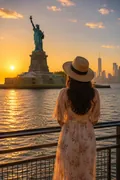
Statue of Liberty Sunrise
The statue at sunrise, harbour flat and the skyline catching the first light.
Place me, from the attached photo, on the harbour at sunrise with the Statue of Liberty across flat water and the Manhattan skyline catching the first light, in a casual jacket with the wind in my hair.
Get the AI prompt for Statue of Liberty Sunrise
- Copy the prompt
- Open your AI app
- Attach your photo and send
Place me, from the attached photo, on the harbour at sunrise with the Statue of Liberty across flat water and the Manhattan skyline catching the first light, in a casual jacket with the wind in my hair. Keep my face the same. A pink and gold sky, gentle haze, a 35mm travel photo look. Vertical 9:16.
Prefer one tap with no pasting, and your face kept the same? Use the app.
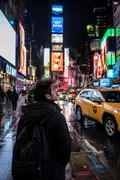
New York Times Square
Times Square at night: billboards, yellow cabs, crowds and rain on the road.
From my attached photo, put me in Times Square at night, standing among yellow cabs and crowds under huge billboards, with rain on the road reflecting red and blue light.
Get the AI prompt for New York Times Square
- Copy the prompt
- Open your AI app
- Attach your photo and send
From my attached photo, put me in Times Square at night, standing among yellow cabs and crowds under huge billboards, with rain on the road reflecting red and blue light. Keep my face exactly as is. A dark trench coat and an umbrella, steam rising from a street grate, cinematic street photography at 35mm. Vertical 9:16.
Prefer one tap with no pasting, and your face kept the same? Use the app.
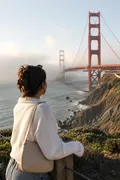
Golden Gate Bridge
The Golden Gate in morning fog, coastline soft and the sun just getting through.
Stand me on a coastal path above the bay with the Golden Gate Bridge rising through morning fog and the sun just breaking through.
Get the AI prompt for Golden Gate Bridge
- Copy the prompt
- Open your AI app
- Attach your photo and send
Stand me on a coastal path above the bay with the Golden Gate Bridge rising through morning fog and the sun just breaking through. Use my attached photo and keep my face unchanged. A windbreaker and jeans, cool soft light, the orange bridge against pale grey, long lens compression. Vertical 9:16. Damp air beads on my sleeves, gulls cross the fog, and the bay below is just visible.
Prefer one tap with no pasting, and your face kept the same? Use the app.
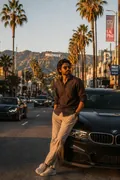
Los Angeles Boulevard
A palm-lined LA boulevard at golden hour, good cars and mountains in the haze.
Show me on a palm lined Los Angeles boulevard at golden hour, leaning against a classic convertible, with hazy mountains at the end of the street.
Get the AI prompt for Los Angeles Boulevard
- Copy the prompt
- Open your AI app
- Attach your photo and send
Show me on a palm lined Los Angeles boulevard at golden hour, leaning against a classic convertible, with hazy mountains at the end of the street. Use the attached photo, keeping my face exactly as photographed. Sunglasses pushed up, light summer clothes, a warm lens flare, 50mm lens. Vertical 9:16.
Prefer one tap with no pasting, and your face kept the same? Use the app.
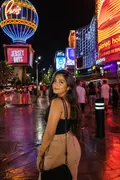
Las Vegas Neon Nights
The Strip at night, signage blazing and neon running down the wet road.
Using my attached photo, place me on the Las Vegas Strip at night in a sharp jacket, with blazing signs and neon streaking down the wet road behind.
Get the AI prompt for Las Vegas Neon Nights
- Copy the prompt
- Open your AI app
- Attach your photo and send
Using my attached photo, place me on the Las Vegas Strip at night in a sharp jacket, with blazing signs and neon streaking down the wet road behind. Keep my face exactly as it is. Pink, blue and gold light across my face, shallow depth of field, passing cars as light trails. Vertical 9:16. The street is busy but blurred, and I stand relaxed with one hand in a pocket, looking confident.
Prefer one tap with no pasting, and your face kept the same? Use the app.
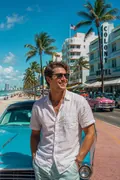
Miami Beach
Art Deco fronts, palms, turquoise water and bright cars on a hot afternoon.
Put me on Miami Beach on a hot afternoon in bright resort clothes, with pastel Art Deco fronts, palms and turquoise water behind me and a colourful convertible parked at the kerb.
Get the AI prompt for Miami Beach
- Copy the prompt
- Open your AI app
- Attach your photo and send
Put me on Miami Beach on a hot afternoon in bright resort clothes, with pastel Art Deco fronts, palms and turquoise water behind me and a colourful convertible parked at the kerb. Use my attached photo and keep my face unchanged. Hard bright sun, saturated colour, 35mm lens. Vertical 9:16. A shop awning in mint and pink, a few palm shadows across the pavement, and a relaxed walking pose.
Prefer one tap with no pasting, and your face kept the same? Use the app.
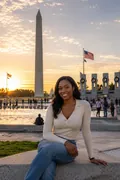
Washington D.C. Monuments
Sunrise at the Lincoln Memorial with flags out along the Mall.
Set me at sunrise in front of the Lincoln Memorial, with the reflecting pool behind and flags lining the National Mall, in a smart coat.
Get the AI prompt for Washington D.C. Monuments
- Copy the prompt
- Open your AI app
- Attach your photo and send
Set me at sunrise in front of the Lincoln Memorial, with the reflecting pool behind and flags lining the National Mall, in a smart coat. Use the attached photo and keep my face exactly as photographed. Soft peach light, mirror reflections in the water, a few early joggers far away. Vertical 9:16. The Washington Monument is faint in the distance, and I stand calmly with my hands in my coat pockets.
Prefer one tap with no pasting, and your face kept the same? Use the app.
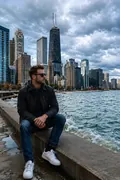
Chicago Skyline
The Chicago waterfront with the skyline up, big clouds and the lake going flat.
From my attached photo, place me on the Chicago lakefront with the skyline standing behind, big white clouds and the lake gone flat and silver.
Get the AI prompt for Chicago Skyline
- Copy the prompt
- Open your AI app
- Attach your photo and send
From my attached photo, place me on the Chicago lakefront with the skyline standing behind, big white clouds and the lake gone flat and silver. Keep my face the same. A windy light jacket, late afternoon sun, a metal rail along the walkway, 28mm lens. Vertical 9:16. The tall glass towers are sharp and the water holds a long reflection, with a few sailboats far out on the lake.
Prefer one tap with no pasting, and your face kept the same? Use the app.
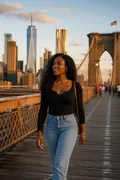
Brooklyn Bridge Sunset
Crossing the Brooklyn Bridge at golden hour with Manhattan lit behind.
Take my attached photo and put me crossing the Brooklyn Bridge on the pedestrian walkway at golden hour, with stone arches and steel cables around me and lit Manhattan towers beyond.
Get the AI prompt for Brooklyn Bridge Sunset
- Copy the prompt
- Open your AI app
- Attach your photo and send
Take my attached photo and put me crossing the Brooklyn Bridge on the pedestrian walkway at golden hour, with stone arches and steel cables around me and lit Manhattan towers beyond. Keep my face exactly as is. Warm side light, casual city clothes, a few walkers blurred, 50mm lens. Vertical 9:16. Gold light rakes across the wooden boards, and I glance back over my shoulder with a relaxed smile.
Prefer one tap with no pasting, and your face kept the same? Use the app.
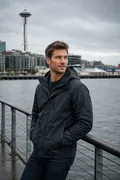
Seattle Waterfront
The Seattle waterfront with the Space Needle behind and Pacific Northwest weather.
Show me, from the attached photo, on the Seattle waterfront with the Space Needle behind, ferries on the water and moody Pacific Northwest weather.
Get the AI prompt for Seattle Waterfront
- Copy the prompt
- Open your AI app
- Attach your photo and send
Show me, from the attached photo, on the Seattle waterfront with the Space Needle behind, ferries on the water and moody Pacific Northwest weather. Keep my face exactly as photographed. A raincoat and beanie, a coffee cup in hand, grey sky with one bright break, damp boards underfoot, 35mm lens. Vertical 9:16.
Prefer one tap with no pasting, and your face kept the same? Use the app.
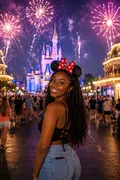
Orlando Theme Park
A theme park in full colour, castle towers up and fireworks starting.
Put me in a colourful theme park with a fairytale castle's towers behind and fireworks starting overhead, in casual summer wear holding a balloon.
Get the AI prompt for Orlando Theme Park
- Copy the prompt
- Open your AI app
- Attach your photo and send
Put me in a colourful theme park with a fairytale castle's towers behind and fireworks starting overhead, in casual summer wear holding a balloon. Use my attached photo and keep my face unchanged. Bright saturated colour, a dusk sky, a happy crowd blurred behind, no cartoon characters, 35mm lens. Vertical 9:16.
Prefer one tap with no pasting, and your face kept the same? Use the app.
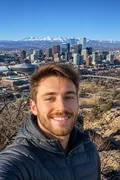
Denver Mountain City
Denver's skyline with the Rockies behind it under a clear blue sky.
Using my attached photo, place me in front of the Denver skyline with the snowy Rockies behind it under a clear blue sky, in a casual outdoor jacket.
Get the AI prompt for Denver Mountain City
- Copy the prompt
- Open your AI app
- Attach your photo and send
Using my attached photo, place me in front of the Denver skyline with the snowy Rockies behind it under a clear blue sky, in a casual outdoor jacket. Keep my face exactly the same. Crisp mountain light, a sharp horizon, a hint of autumn trees at the edge of frame, 35mm lens. Vertical 9:16. The glass towers are crisp and small below the peaks, and I stand relaxed with my backpack on one shoulder.
Prefer one tap with no pasting, and your face kept the same? Use the app.
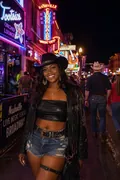
Nashville at Night
Broadway after dark: live music venues, neon signage and boots on everyone.
Show me on Broadway in Nashville after dark, in boots and a denim jacket, with live music venues, neon signs and people in boots all around.
Get the AI prompt for Nashville at Night
- Copy the prompt
- Open your AI app
- Attach your photo and send
Show me on Broadway in Nashville after dark, in boots and a denim jacket, with live music venues, neon signs and people in boots all around. Use the attached photo and keep my face unchanged. Red and blue neon, warm doorway light, a guitar case over one shoulder, 35mm lens. Vertical 9:16. Bar signs glow behind, and a band is just visible through an open door, with a warm, friendly smile.
Prefer one tap with no pasting, and your face kept the same? Use the app.

Honolulu Paradise
Waikiki with palms, Diamond Head down the beach and surfers out in the water.
From my attached photo, put me on Waikiki beach in a light shirt, with palms, Diamond Head down the shore and surfers out on the water.
Get the AI prompt for Honolulu Paradise
- Copy the prompt
- Open your AI app
- Attach your photo and send
From my attached photo, put me on Waikiki beach in a light shirt, with palms, Diamond Head down the shore and surfers out on the water. Keep my face exactly as photographed. Bright tropical light, turquoise water, a sea breeze in my hair, 35mm lens. Vertical 9:16. Soft white sand underfoot, a flower lei around my neck, a few beach umbrellas dotted behind, and a relaxed, sunny smile.
Prefer one tap with no pasting, and your face kept the same? Use the app.
How to use these prompts in Gemini (Nano Banana) or ChatGPT
- Pick a prompt above and tap Copy prompt, or Open in Gemini to copy and open it in one go.
- In Gemini or ChatGPT, attach a clear photo of your face (or of everyone in the picture).
- Paste the prompt, fill in anything in [brackets], and send.
- Not quite right? Reply with one change, such as "warmer light" or "keep my face exactly the same".
From selfie to World Cities & Landmarks in three taps
Pick a style
Choose a look from the World Cities & Landmarks collection above. No editing skill needed.
Upload a photo
Add a clear, well-lit selfie. It is used only to make your image and is deleted afterward.
Generate and share
Your AI photo is ready in seconds to download or share anywhere.
Tips for the best result
Use a clear, front-facing selfie in good light so your face translates cleanly into the look.
Why city and landmark photos feel like proof you were there
There is something about a famous skyline behind your smile that turns an ordinary picture into a story. A landmark says where, a face says who, and the two together read as a memory even when they are pure imagination. That is exactly what this collection is built to do: place your face convincingly in front of the places people recognise instantly, so the photo carries the confident, well-travelled feeling of a trip you can talk about, without the flights, the crowds or the camera roll full of near-misses.
A closer look at the styles
With Trendy AI Lab the World Cities & Landmarks collection turns a single selfie into cinematic travel photography set against iconic backdrops. Picture yourself framed by the Statue of Liberty with the harbour behind you, standing in the electric wash of Times Square billboards at night, or leaning into the fog and cables of the Golden Gate Bridge as the light goes gold.
The mood shifts city to city. Las Vegas leans into neon and after-dark glamour. Miami brings pastel Art Deco, palm shadows and beachfront warmth. Honolulu adds ocean blues and an easy island glow, while classic New York and Los Angeles looks range from bright daytime street scenes to moody, film-like evenings. Each style handles its own lighting and composition for you, so you are not just pasted onto a postcard: the shot is styled like a real travel photographer set it up, with depth, atmosphere and a believable sense of place.
Because the artwork is original and brand-neutral, you get the feeling of these destinations without any real company logos or copied signage, and your face stays recognisably yours through the transformation.
Ideas and occasions
These make excellent profile pictures when you want to look worldly and in motion rather than static. A New York night shot or a Golden Gate portrait refreshes a dating profile, a LinkedIn header or a WhatsApp display picture in seconds. They are fun to drop as a status update with a playful caption like a fake location check-in, and they make a warm surprise for friends and family who love a certain city. Planning a trip, celebrating a bucket-list dream, or just missing a place you love are all good reasons to make one. Generate a few different cities and post them as a mini travel series your followers will double-take on.
Getting the best result
- Start with a clear, front-facing selfie in even, natural light. Soft daylight from a window beats harsh overhead light or heavy shadow across half your face.
- Keep your face unobstructed: skip sunglasses, and pull hair back off your cheeks so the AI has a clean read of your features.
- Match energy to the setting. A relaxed, open expression suits Miami and Honolulu, while a cooler, composed look fits nighttime Vegas or Times Square.
- Try more than one city from the same selfie. The looks vary a lot, and comparing a few side by side helps you find the one that feels most like you.
- If the first result is not quite right, regenerate. Small changes in the crop or lighting of your source photo can noticeably improve how naturally your face lands in the scene.
Ready to see yourself at the world's most famous landmarks? Copy the free prompt, or make it in the Android app with a plan.
World Cities & Landmarks: photos, prompts and plans explained
Can I choose which landmark I appear at?
Yes. Pick the specific style for the city or landmark you want, from the Statue of Liberty and Times Square to the Golden Gate Bridge, Vegas, Miami or Honolulu, and the scene is built around that location.
Do I need to have visited the place?
Not at all. The whole point is that one selfie is enough. You never have to travel, and you can make a set of different cities in a single sitting.
What happens to the selfie I upload?
It is used only to generate your image and then deleted. It is never used for advertising, so you can create freely.
How do I make a photo from the World Cities & Landmarks collection?
Open the Trendy AI Lab app, pick a style from the World Cities & Landmarks collection, upload a photo, and the app generates your image in seconds. You can then download or share it.
What photo works best for World Cities & Landmarks?
Use a clear, front-facing selfie in good light so your face translates cleanly into the look.
Is Trendy AI Lab free?
The prompt for every style is free: copy it into ChatGPT or Gemini. Making the image in the app, with your face kept the same, needs a weekly or monthly plan, and the browser image tools are free with no account.
Which platforms is it available on?
The image tools work in any browser, on phone or desktop. The AI trends are in the Android app, with the iOS version coming soon.
How is my photo used?
Your photo is sent to a third-party AI service only to generate your image, and the upload is deleted afterwards. It is never used for advertising.
Make yours from the World Cities & Landmarks collection
Copy a free prompt for any style here, or make it with your own face in the Trendy AI Lab app.

 Coming soon