AI Valentine's Day Photo Maker 2027
Explore the 15 AI photo styles in the Valentine's Day collection from Trendy AI Lab, including Classic Romantic Date, Valentine's Couple Portrait, Rose Garden Romance and Candlelight Dinner. Pick a style, upload a selfie, and create a share-worthy AI image in seconds with a plan on Android. The prompt for each style is free to copy.
Updated

AI prompt for Classic Romantic Date
- Copy the prompt
- Open your AI app
- Attach your photo and send
Place me, from the attached photo, at an intimate candlelit Valentine's dinner with a partner. Red roses on the table, an elegant place setting, wine glasses catching the flame, warm romantic light. My face stays exactly as in the photo, same features and skin tone; I am the main subject, leaning slightly in with a soft smile. Natural documentary photography feel, shallow depth of field like a 50mm lens, realistic skin, vertical 9:16.
Prefer one tap with no pasting, and your face kept the same? Use the app.
The Valentine's Day collection turns your selfie into romantic AI photos, couple portraits, candlelit dates, rose gardens, proposals and a personalized Happy Valentine's Day greeting.
- Romantic Valentine's photos from a single selfie
- Couple and solo date-night looks to choose from
- A Happy Valentine's Day greeting with your own message
Place me, from the attached photo, at an intimate candlelit Valentine's dinner with a partner. Red roses on the table, an elegant place setting, wine glasses catching the flame, warm romantic light. My face stays exactly as in the photo, same features and skin tone; I am the main subject, leaning slightly in with a soft smile. Natural documentary photography feel, shallow depth of field like a 50mm lens, realistic skin, vertical 9:16.

Photograph me and a loved one outdoors at sunset, using the attached photo for my face. Roses climb everywhere around us, the light is low and golden, our expressions loving and relaxed, standing close with foreheads nearly touching. I stay the clear main subject and my face should look exactly like the photo. Soft rim light in my hair, a natural travel photography feel, vertical 9:16.

I want a photo of myself walking hand in hand with a partner through a blooming rose garden at golden hour. Use the attached photo for my face and keep it identical, same features and age. Warm backlight through the petals, hedges of red and pink roses, a gravel path, a light summery outfit. Tender mood, a gentle glance toward each other, 85mm look with a soft background, vertical 9:16.

Seat me, from the attached photo, at a fine restaurant table set for Valentine's Day: tall candles, red roses, crystal glassware and crisp linen, with a soft upscale room glowing behind. My face must remain exactly as in the photo. Dress me in an elegant evening outfit, relaxed posture, a quiet smile toward the flame. Warm low light, shallow focus, realistic documentary style, vertical 9:16.

Show me reading a handwritten love letter beside a window, using my attached photo for the face, unchanged. A bouquet of red roses sits on the sill, soft morning light falls across the page, and I wear a cosy knit sweater. Emotional and tender, a small smile with my eyes on the paper. Natural window light, gentle film warmth, realistic skin, vertical 9:16.

Picture me walking hand in hand with a partner down a lit city street at night, with my face taken from the attached photo and left exactly as it is. Glowing shopfronts, wet pavement mirroring the neon and warm windows, a long coat and scarf. Cinematic street photography, a quick glance back toward the camera, 35mm lens feel, vertical 9:16.

Create a cosy Valentine's morning at home from the attached photo: me having coffee and breakfast with a partner, flowers on the table, pastries, soft sun through sheer curtains. My face is exactly the same as the photo, same features. Relaxed pyjamas or a soft sweater, laughing over a shared cup. Natural documentary light, shallow depth of field, vertical 9:16.

Capture a sunset proposal on a scenic clifftop, with the attached photo giving my face, unchanged. My partner kneels with a ring box while I react with happy surprise, hands to my mouth, golden light and sea air in my hair. I stay the main subject. Warm backlight, wide sky, honest emotional expressions, documentary photography look, vertical 9:16.

Celebrate an engagement outdoors using the attached photo for me. I show off a ring with a partner beside me, flowers in hand, both of us in elegant clothes and laughing. My face is identical to the photo. Garden setting, soft afternoon light, a slight lean toward each other with hands in clear view, natural documentary photography, vertical 9:16.

Set me in a luxury hotel suite prepared for Valentine's Day, with my face copied exactly from the attached photo. Red roses everywhere, lit candles, wrapped gifts, heart shaped details on the bed and a city view through tall windows. An elegant robe or dress, a calm pose on the edge of the sofa. Warm lamp light, soft contrast, realistic documentary style, vertical 9:16.

Make a cute Valentine's gift scene from the attached photo: me sitting on a cosy bed with wrapped gifts, a teddy bear, red roses, chocolates and a handwritten card. My face stays exactly as photographed. Soft pink and red tones, fairy lights over the headboard, a happy smile as I open the card. Warm lamp light, natural documentary feel, vertical 9:16.

Walk me under one shared umbrella with a partner on a rainy city street, taking my face from the attached photo and leaving it unchanged. Glowing windows and puddles reflecting amber light, a trench coat, raindrops caught in the air. Tender mood, heads tilted together. Cinematic look, 50mm lens, gentle film grain, vertical 9:16.

Show me barefoot on the beach at sunset with a partner, with the attached photo as my face reference, unchanged. Waves washing at our ankles, red roses in my hand, a few small heart decorations in the sand, linen clothes moving in the breeze. Warm golden light, relaxed smiles, long shadows, documentary photography, vertical 9:16.

Create a long distance Valentine's moment: I am on a video call with my partner, who appears on the phone screen, and my face comes from the attached photo, unchanged. I sit surrounded by roses, heart decorations and warm string lights, smiling at the screen. Cosy room, soft lamp light, a heartfelt mood, shallow depth of field, vertical 9:16.

Turn the attached photo into a Valentine's greeting card: me with a warm, loving smile, surrounded by red roses, candles, heart shaped decorations and soft glowing lights. My face stays exactly as in the photo. Leave a clean area of space and write [greeting, for example Happy Valentine's Day] in elegant lettering, spelled exactly. Rich reds and warm gold, soft glow, portrait lens, vertical 9:16.


Next festivals to make photos for
All 15 styles in Valentine's Day
Every style here returns a tall 9:16 image, sized to fill a phone screen and works from one photo.

Classic Romantic Date
Dinner by candlelight with roses on the table and the lighting doing half the work.
Place me, from the attached photo, at an intimate candlelit Valentine's dinner with a partner.
Get the AI prompt for Classic Romantic Date
- Copy the prompt
- Open your AI app
- Attach your photo and send
Place me, from the attached photo, at an intimate candlelit Valentine's dinner with a partner. Red roses on the table, an elegant place setting, wine glasses catching the flame, warm romantic light. My face stays exactly as in the photo, same features and skin tone; I am the main subject, leaning slightly in with a soft smile. Natural documentary photography feel, shallow depth of field like a 50mm lens, realistic skin, vertical 9:16.
Prefer one tap with no pasting, and your face kept the same? Use the app.
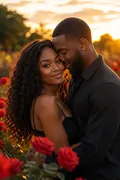
Valentine's Couple Portrait
The two of you outdoors in sunset light, roses everywhere you look.
Photograph me and a loved one outdoors at sunset, using the attached photo for my face.
Get the AI prompt for Valentine's Couple Portrait
- Copy the prompt
- Open your AI app
- Attach your photo and send
Photograph me and a loved one outdoors at sunset, using the attached photo for my face. Roses climb everywhere around us, the light is low and golden, our expressions loving and relaxed, standing close with foreheads nearly touching. I stay the clear main subject and my face should look exactly like the photo. Soft rim light in my hair, a natural travel photography feel, vertical 9:16.
Prefer one tap with no pasting, and your face kept the same? Use the app.
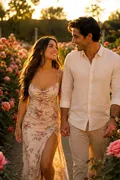
Rose Garden Romance
Hand in hand through a rose garden at golden hour, everything in bloom.
I want a photo of myself walking hand in hand with a partner through a blooming rose garden at golden hour.
Get the AI prompt for Rose Garden Romance
- Copy the prompt
- Open your AI app
- Attach your photo and send
I want a photo of myself walking hand in hand with a partner through a blooming rose garden at golden hour. Use the attached photo for my face and keep it identical, same features and age. Warm backlight through the petals, hedges of red and pink roses, a gravel path, a light summery outfit. Tender mood, a gentle glance toward each other, 85mm look with a soft background, vertical 9:16.
Prefer one tap with no pasting, and your face kept the same? Use the app.
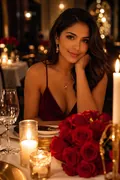
Candlelight Dinner
A fine table: candles, red roses and glassware that means someone booked ahead.
Seat me, from the attached photo, at a fine restaurant table set for Valentine's Day: tall candles, red roses, crystal glassware and crisp linen, with a soft upscale room glowing behind.
Get the AI prompt for Candlelight Dinner
- Copy the prompt
- Open your AI app
- Attach your photo and send
Seat me, from the attached photo, at a fine restaurant table set for Valentine's Day: tall candles, red roses, crystal glassware and crisp linen, with a soft upscale room glowing behind. My face must remain exactly as in the photo. Dress me in an elegant evening outfit, relaxed posture, a quiet smile toward the flame. Warm low light, shallow focus, realistic documentary style, vertical 9:16.
Prefer one tap with no pasting, and your face kept the same? Use the app.

Love Letter Moment
Reading a handwritten letter by the window, a bouquet of roses on the sill.
Show me reading a handwritten love letter beside a window, using my attached photo for the face, unchanged.
Get the AI prompt for Love Letter Moment
- Copy the prompt
- Open your AI app
- Attach your photo and send
Show me reading a handwritten love letter beside a window, using my attached photo for the face, unchanged. A bouquet of red roses sits on the sill, soft morning light falls across the page, and I wear a cosy knit sweater. Emotional and tender, a small smile with my eyes on the paper. Natural window light, gentle film warmth, realistic skin, vertical 9:16.
Prefer one tap with no pasting, and your face kept the same? Use the app.
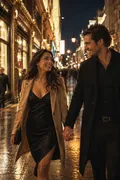
City Date Night
Walking a lit street at night, hand in hand, the city glowing off the wet pavement.
Picture me walking hand in hand with a partner down a lit city street at night, with my face taken from the attached photo and left exactly as it is.
Get the AI prompt for City Date Night
- Copy the prompt
- Open your AI app
- Attach your photo and send
Picture me walking hand in hand with a partner down a lit city street at night, with my face taken from the attached photo and left exactly as it is. Glowing shopfronts, wet pavement mirroring the neon and warm windows, a long coat and scarf. Cinematic street photography, a quick glance back toward the camera, 35mm lens feel, vertical 9:16.
Prefer one tap with no pasting, and your face kept the same? Use the app.

Cozy Valentine's Morning
Coffee and breakfast at home, flowers on the table and morning light doing the rest.
Create a cosy Valentine's morning at home from the attached photo: me having coffee and breakfast with a partner, flowers on the table, pastries, soft sun through sheer curtains.
Get the AI prompt for Cozy Valentine's Morning
- Copy the prompt
- Open your AI app
- Attach your photo and send
Create a cosy Valentine's morning at home from the attached photo: me having coffee and breakfast with a partner, flowers on the table, pastries, soft sun through sheer curtains. My face is exactly the same as the photo, same features. Relaxed pyjamas or a soft sweater, laughing over a shared cup. Natural documentary light, shallow depth of field, vertical 9:16.
Prefer one tap with no pasting, and your face kept the same? Use the app.
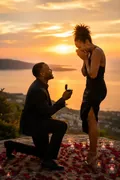
Sunset Proposal
The proposal itself, caught somewhere scenic with the light going gold.
Capture a sunset proposal on a scenic clifftop, with the attached photo giving my face, unchanged.
Get the AI prompt for Sunset Proposal
- Copy the prompt
- Open your AI app
- Attach your photo and send
Capture a sunset proposal on a scenic clifftop, with the attached photo giving my face, unchanged. My partner kneels with a ring box while I react with happy surprise, hands to my mouth, golden light and sea air in my hair. I stay the main subject. Warm backlight, wide sky, honest emotional expressions, documentary photography look, vertical 9:16.
Prefer one tap with no pasting, and your face kept the same? Use the app.

Engagement Romance
The celebration after the yes: ring on, flowers out, both of you dressed for it.
Celebrate an engagement outdoors using the attached photo for me.
Get the AI prompt for Engagement Romance
- Copy the prompt
- Open your AI app
- Attach your photo and send
Celebrate an engagement outdoors using the attached photo for me. I show off a ring with a partner beside me, flowers in hand, both of us in elegant clothes and laughing. My face is identical to the photo. Garden setting, soft afternoon light, a slight lean toward each other with hands in clear view, natural documentary photography, vertical 9:16.
Prefer one tap with no pasting, and your face kept the same? Use the app.

Luxury Valentine's Setup
A hotel suite done properly for the occasion, roses, candles and hearts included.
Set me in a luxury hotel suite prepared for Valentine's Day, with my face copied exactly from the attached photo.
Get the AI prompt for Luxury Valentine's Setup
- Copy the prompt
- Open your AI app
- Attach your photo and send
Set me in a luxury hotel suite prepared for Valentine's Day, with my face copied exactly from the attached photo. Red roses everywhere, lit candles, wrapped gifts, heart shaped details on the bed and a city view through tall windows. An elegant robe or dress, a calm pose on the edge of the sofa. Warm lamp light, soft contrast, realistic documentary style, vertical 9:16.
Prefer one tap with no pasting, and your face kept the same? Use the app.

Cute Valentine's Gift Scene
Wrapped gifts, a teddy, roses, chocolates and a card someone actually wrote by hand.
Make a cute Valentine's gift scene from the attached photo: me sitting on a cosy bed with wrapped gifts, a teddy bear, red roses, chocolates and a handwritten card.
Get the AI prompt for Cute Valentine's Gift Scene
- Copy the prompt
- Open your AI app
- Attach your photo and send
Make a cute Valentine's gift scene from the attached photo: me sitting on a cosy bed with wrapped gifts, a teddy bear, red roses, chocolates and a handwritten card. My face stays exactly as photographed. Soft pink and red tones, fairy lights over the headboard, a happy smile as I open the card. Warm lamp light, natural documentary feel, vertical 9:16.
Prefer one tap with no pasting, and your face kept the same? Use the app.
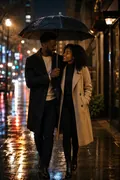
Rainy Day Romance
Sharing an umbrella on a rainy street, warm light reflecting up off the road.
Walk me under one shared umbrella with a partner on a rainy city street, taking my face from the attached photo and leaving it unchanged.
Get the AI prompt for Rainy Day Romance
- Copy the prompt
- Open your AI app
- Attach your photo and send
Walk me under one shared umbrella with a partner on a rainy city street, taking my face from the attached photo and leaving it unchanged. Glowing windows and puddles reflecting amber light, a trench coat, raindrops caught in the air. Tender mood, heads tilted together. Cinematic look, 50mm lens, gentle film grain, vertical 9:16.
Prefer one tap with no pasting, and your face kept the same? Use the app.

Beachside Romance
Barefoot along the shore at sunset with roses in hand and the surf coming in.
Show me barefoot on the beach at sunset with a partner, with the attached photo as my face reference, unchanged.
Get the AI prompt for Beachside Romance
- Copy the prompt
- Open your AI app
- Attach your photo and send
Show me barefoot on the beach at sunset with a partner, with the attached photo as my face reference, unchanged. Waves washing at our ankles, red roses in my hand, a few small heart decorations in the sand, linen clothes moving in the breeze. Warm golden light, relaxed smiles, long shadows, documentary photography, vertical 9:16.
Prefer one tap with no pasting, and your face kept the same? Use the app.

Long-Distance Love
Valentine's on a video call, roses and decorations on your side of the screen.
Create a long distance Valentine's moment: I am on a video call with my partner, who appears on the phone screen, and my face comes from the attached photo, unchanged.
Get the AI prompt for Long-Distance Love
- Copy the prompt
- Open your AI app
- Attach your photo and send
Create a long distance Valentine's moment: I am on a video call with my partner, who appears on the phone screen, and my face comes from the attached photo, unchanged. I sit surrounded by roses, heart decorations and warm string lights, smiling at the screen. Cosy room, soft lamp light, a heartfelt mood, shallow depth of field, vertical 9:16.
Prefer one tap with no pasting, and your face kept the same? Use the app.

Valentine's Day Greeting
A Happy Valentine's Day card among red roses, candles, hearts and soft light.
Options: Greeting message.
Turn the attached photo into a Valentine's greeting card: me with a warm, loving smile, surrounded by red roses, candles, heart shaped decorations and soft glowing lights.
Get the AI prompt for Valentine's Day Greeting
- Copy the prompt
- Open your AI app
- Attach your photo and send
Turn the attached photo into a Valentine's greeting card: me with a warm, loving smile, surrounded by red roses, candles, heart shaped decorations and soft glowing lights. My face stays exactly as in the photo. Leave a clean area of space and write [greeting, for example Happy Valentine's Day] in elegant lettering, spelled exactly. Rich reds and warm gold, soft glow, portrait lens, vertical 9:16.
Prefer one tap with no pasting, and your face kept the same? Use the app.
How to use these prompts in Gemini (Nano Banana) or ChatGPT
- Pick a prompt above and tap Copy prompt, or Open in Gemini to copy and open it in one go.
- In Gemini or ChatGPT, attach a clear photo of your face (or of everyone in the picture).
- Paste the prompt, fill in anything in [brackets], and send.
- Not quite right? Reply with one change, such as "warmer light" or "keep my face exactly the same".
From selfie to Valentine's Day in three taps
Pick a style
Choose a look from the Valentine's Day collection above. No editing skill needed.
Upload a photo
Add a clear, well-lit selfie. It is used only to make your image and is deleted afterward.
Generate and share
Your AI photo is ready in seconds to download or share anywhere.
Tips for the best result
Use a clear, front-facing selfie in good light so your face translates cleanly into the look.
Valentine's Day: photos, prompts and plans explained
Is there a Valentine's style for a long-distance couple?
Yes. Long-Distance Love is made for partners who are apart on 14 February, and Valentine's Day Greeting works as a card you can send.
Which Valentine's style suits a proposal?
Sunset Proposal and Engagement Romance are built around a proposal, and Candlelight Dinner suits a date night photo.
How do I make a photo from the Valentine's Day collection?
Open the Trendy AI Lab app, pick a style from the Valentine's Day collection, upload a photo, and the app generates your image in seconds. You can then download or share it.
What photo works best for Valentine's Day?
Use a clear, front-facing selfie in good light so your face translates cleanly into the look.
Is Trendy AI Lab free?
The prompt for every style is free: copy it into ChatGPT or Gemini. Making the image in the app, with your face kept the same, needs a weekly or monthly plan, and the browser image tools are free with no account.
Which platforms is it available on?
The image tools work in any browser, on phone or desktop. The AI trends are in the Android app, with the iOS version coming soon.
How is my photo used?
Your photo is sent to a third-party AI service only to generate your image, and the upload is deleted afterwards. It is never used for advertising.
Make yours from the Valentine's Day collection
Copy a free prompt for any style here, or make it with your own face in the Trendy AI Lab app.

 Coming soon