AI Eid ul Adha Photo Maker 2027
Explore the 5 AI photo styles in the Eid-ul-Adha collection from Trendy AI Lab, including Eid Prayer Portrait, Family Feast Table, Kids Eid Outfit and Eid Family Celebration. Pick a style, upload a selfie, and create a share-worthy AI image in seconds with a plan on Android. The prompt for each style is free to copy.
Updated
This is a seasonal collection. Browse the styles here any time, they return in the app for the season. See what's available now.

AI prompt for Eid Prayer Portrait
- Copy the prompt
- Open your AI app
- Attach your photo and send
Make a calm portrait of me from the attached photo after the Eid namaz, wearing [outfit, for example a crisp white thobe with a bisht and a keffiyeh], standing [setting, for example on a wide mosque courtyard with prayer rugs still laid in rows]. Keep my face exactly as in the photo, composed and gentle. Soft morning light, warm stone, shallow depth of field, a quiet mood. Add the greeting [greeting, for example Eid Mubarak], spelled exactly. Vertical 9:16.
Prefer one tap with no pasting, and your face kept the same? Use the app.
The Eid-ul-Adha collection turns your photo into elegant AI Eid photos, a post-prayer portrait, the family feast table, a kids' new-clothes portrait, greetings at the door and a quiet Eid morning, keeping every face recognizable while the outfit, setting and light are styled around you.
- Prayer, feast and family greeting scenes from a single photo
- Choose your outfit, the setting, the mood and your greeting
- Geometric and arabesque decor, never garbled script
Make a calm portrait of me from the attached photo after the Eid namaz, wearing [outfit, for example a crisp white thobe with a bisht and a keffiyeh], standing [setting, for example on a wide mosque courtyard with prayer rugs still laid in rows]. Keep my face exactly as in the photo, composed and gentle. Soft morning light, warm stone, shallow depth of field, a quiet mood. Add the greeting [greeting, for example Eid Mubarak], spelled exactly. Vertical 9:16.

Gather a family photo from the attached photo, with everyone in it around a table, wearing [outfit, for example coordinated white and gold traditional festive outfits], the table laid with [table setting, for example biryani, haleem, kebabs and fresh naan]. Keep every face exactly as in the photo, happy and relaxed. Warm room, soft golden light, steam rising, shallow depth of field. Add [greeting, for example Eid Mubarak], spelled exactly. Vertical 9:16.

Show the child in the attached photo proudly showing off new Eid clothes, wearing [outfit, for example a bright festive Eid outfit that suits the child], [setting, for example in a warmly decorated family living room hung with lanterns], holding [prop, for example a bunch of shiny balloons and a wrapped gift]. Keep the face exactly as in the photo, natural and happy, nothing grown up about the styling. Soft warm light, cheerful colour. Vertical 9:16.

Make a warm photo using the attached photo, with everyone in it, embracing at the door as relatives arrive for Eid, in [outfit, for example coordinated white and gold traditional festive outfits], [setting, for example in a decorated living room as relatives arrive]. Keep every face as in the photo, with mood [mood, for example warm and welcoming, full of easy affection]. Lanterns, small gifts, soft indoor light. Vertical 9:16.

Create a quiet morning portrait of me from the attached photo, dressed for Eid in [outfit, for example a crisp white thobe with a prayer cap], [setting, for example at a sunlit window getting ready in the early morning], a little attar and a plate of dates nearby. Keep my face unchanged and serene. First light, long soft shadows, cream and pale gold tones, shallow focus. Vertical 9:16.


Next festivals to make photos for
All 5 styles in Eid-ul-Adha
Every style here returns a tall 9:16 image, sized to fill a phone screen and works from one photo.
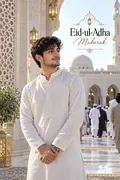
Eid Prayer Portrait
Calm and composed after the Eid namaz.
Options: Outfit, Setting, Greeting.
Make a calm portrait of me from the attached photo after the Eid namaz, wearing [outfit, for example a crisp white thobe with a bisht and a keffiyeh], standing [setting, for example on a wide mosque courtyard with
Get the AI prompt for Eid Prayer Portrait
- Copy the prompt
- Open your AI app
- Attach your photo and send
Make a calm portrait of me from the attached photo after the Eid namaz, wearing [outfit, for example a crisp white thobe with a bisht and a keffiyeh], standing [setting, for example on a wide mosque courtyard with prayer rugs still laid in rows]. Keep my face exactly as in the photo, composed and gentle. Soft morning light, warm stone, shallow depth of field, a quiet mood. Add the greeting [greeting, for example Eid Mubarak], spelled exactly. Vertical 9:16.
Prefer one tap with no pasting, and your face kept the same? Use the app.
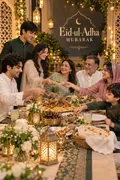
Family Feast Table
The family round a table carrying everything the day is known for.
Options: Outfit, Table setting, Greeting.
Gather a family photo from the attached photo, with everyone in it around a table, wearing [outfit, for example coordinated white and gold traditional festive outfits], the table laid with [table setting, for example
Get the AI prompt for Family Feast Table
- Copy the prompt
- Open your AI app
- Attach your photo and send
Gather a family photo from the attached photo, with everyone in it around a table, wearing [outfit, for example coordinated white and gold traditional festive outfits], the table laid with [table setting, for example biryani, haleem, kebabs and fresh naan]. Keep every face exactly as in the photo, happy and relaxed. Warm room, soft golden light, steam rising, shallow depth of field. Add [greeting, for example Eid Mubarak], spelled exactly. Vertical 9:16.
Prefer one tap with no pasting, and your face kept the same? Use the app.
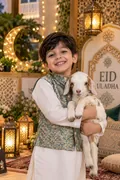
Kids Eid Outfit
New clothes and a show-and-tell nobody asked for but everybody enjoys.
Options: Outfit, Setting, Prop.
Show the child in the attached photo proudly showing off new Eid clothes, wearing [outfit, for example a bright festive Eid outfit that suits the child], [setting, for example in a warmly decorated family living room
Get the AI prompt for Kids Eid Outfit
- Copy the prompt
- Open your AI app
- Attach your photo and send
Show the child in the attached photo proudly showing off new Eid clothes, wearing [outfit, for example a bright festive Eid outfit that suits the child], [setting, for example in a warmly decorated family living room hung with lanterns], holding [prop, for example a bunch of shiny balloons and a wrapped gift]. Keep the face exactly as in the photo, natural and happy, nothing grown up about the styling. Soft warm light, cheerful colour. Vertical 9:16.
Prefer one tap with no pasting, and your face kept the same? Use the app.
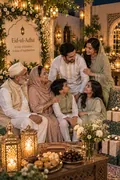
Eid Family Celebration
Embraces at the door as everyone arrives for Eid.
Options: Outfit, Setting, Mood.
Make a warm photo using the attached photo, with everyone in it, embracing at the door as relatives arrive for Eid, in [outfit, for example coordinated white and gold traditional festive outfits], [setting, for example
Get the AI prompt for Eid Family Celebration
- Copy the prompt
- Open your AI app
- Attach your photo and send
Make a warm photo using the attached photo, with everyone in it, embracing at the door as relatives arrive for Eid, in [outfit, for example coordinated white and gold traditional festive outfits], [setting, for example in a decorated living room as relatives arrive]. Keep every face as in the photo, with mood [mood, for example warm and welcoming, full of easy affection]. Lanterns, small gifts, soft indoor light. Vertical 9:16.
Prefer one tap with no pasting, and your face kept the same? Use the app.
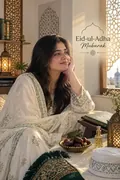
Eid Morning Portrait
First light, attar on and new clothes. The quiet start to Eid.
Options: Outfit, Setting, Greeting.
Create a quiet morning portrait of me from the attached photo, dressed for Eid in [outfit, for example a crisp white thobe with a prayer cap], [setting, for example at a sunlit window getting ready in the early
Get the AI prompt for Eid Morning Portrait
- Copy the prompt
- Open your AI app
- Attach your photo and send
Create a quiet morning portrait of me from the attached photo, dressed for Eid in [outfit, for example a crisp white thobe with a prayer cap], [setting, for example at a sunlit window getting ready in the early morning], a little attar and a plate of dates nearby. Keep my face unchanged and serene. First light, long soft shadows, cream and pale gold tones, shallow focus. Vertical 9:16.
Prefer one tap with no pasting, and your face kept the same? Use the app.
How to use these prompts in Gemini (Nano Banana) or ChatGPT
- Pick a prompt above and tap Copy prompt, or Open in Gemini to copy and open it in one go.
- In Gemini or ChatGPT, attach a clear photo of your face (or of everyone in the picture).
- Paste the prompt, fill in anything in [brackets], and send.
- Not quite right? Reply with one change, such as "warmer light" or "keep my face exactly the same".
From selfie to Eid-ul-Adha in three taps
Pick a style
Choose a look from the Eid-ul-Adha collection above. No editing skill needed.
Upload a photo
Add a clear, well-lit selfie. It is used only to make your image and is deleted afterward.
Generate and share
Your AI photo is ready in seconds to download or share anywhere.
Tips for the best result
Use a clear, well-lit photo showing your full face so the soft morning light lands naturally.
Eid-ul-Adha: photos, prompts and plans explained
How do I make a photo from the Eid-ul-Adha collection?
Open the Trendy AI Lab app, pick a style from the Eid-ul-Adha collection, upload a photo, and the app generates your image in seconds. You can then download or share it.
What photo works best for Eid-ul-Adha?
Use a clear, well-lit photo showing your full face so the soft morning light lands naturally.
Is Trendy AI Lab free?
The prompt for every style is free: copy it into ChatGPT or Gemini. Making the image in the app, with your face kept the same, needs a weekly or monthly plan, and the browser image tools are free with no account.
Which platforms is it available on?
The image tools work in any browser, on phone or desktop. The AI trends are in the Android app, with the iOS version coming soon.
How is my photo used?
Your photo is sent to a third-party AI service only to generate your image, and the upload is deleted afterwards. It is never used for advertising.
Make yours from the Eid-ul-Adha collection
Copy a free prompt for any style here, or make it with your own face in the Trendy AI Lab app.

 Coming soon