AI Raksha Bandhan Photo Maker 2027
Explore the 5 AI photo styles in the Raksha Bandhan collection from Trendy AI Lab, including Rakhi Tying, Sibling Bond Portrait, Brother-Sister Celebration and Then & Now Siblings. Pick a style, upload a selfie, and create a share-worthy AI image in seconds with a plan on Android. The prompt for each style is free to copy.
Updated
This is a seasonal collection. Browse the styles here any time, they return in the app for the season. See what's available now.

AI prompt for Rakhi Tying
- Copy the prompt
- Open your AI app
- Attach your photo and send
Use the two attached photos, the sister's and the brother's, to make a vertical 9:16 image in two stacked panels. Top: the sister ties a rakhi on her brother's outstretched wrist, both heads bent toward their hands. Bottom: the moment after, a warm hug and a laddoo shared. Each keeps their own face and features. They wear [traditional Indian festive wear] in coordinated colours, in [a warmly decorated living room with a marigold toran and fairy lights], with a thali, a lit diya and sweets. Write [Happy Raksha Bandhan] across the bottom, spelled exactly.
Prefer one tap with no pasting, and your face kept the same? Use the app.
The Raksha Bandhan collection turns your photos into AI sibling photos, the rakhi being tied, a then-and-now childhood diptych, a rakhi thali portrait, a kids' celebration and a warm sibling portrait, keeping every face recognizable while the outfit, setting and mood are styled around you.
- Upload both siblings separately for the two-photo styles
- Choose your outfit, the setting, the thali and your greeting
- A then-and-now diptych showing you as kids and today
Use the two attached photos, the sister's and the brother's, to make a vertical 9:16 image in two stacked panels. Top: the sister ties a rakhi on her brother's outstretched wrist, both heads bent toward their hands. Bottom: the moment after, a warm hug and a laddoo shared. Each keeps their own face and features. They wear [traditional Indian festive wear] in coordinated colours, in [a warmly decorated living room with a marigold toran and fairy lights], with a thali, a lit diya and sweets. Write [Happy Raksha Bandhan] across the bottom, spelled exactly.

Make a close sibling portrait from my attached photo of the two of us, standing with heads tilted together, one arm around the other's shoulder, a rakhi on the wrist. Our faces stay exactly as photographed, one caught mid-laugh while the other smiles at them. We wear [traditional Indian festive wear], in [a warmly decorated living room with a marigold toran and fairy lights]. Mood: [warm and nostalgic]. Soft golden light, flowers and fairy lights blurred behind, a 50mm look. Vertical 9:16, keep exactly the two of us.

Turn the attached photo of the siblings into a joyful Raksha Bandhan scene: they are mid-laugh together, one reaching for sweets while the other tugs a sleeve, sharing [a big box of mithai being opened together]. Keep each child's face and features exactly as photographed, and the children simply and age-appropriately dressed in [traditional Indian festive wear]. Setting: [a warmly decorated living room with a marigold toran and fairy lights], with rakhis, diyas and flowers around. Warm natural light, candid fun. Vertical 9:16, no one added or removed.

From the two attached photos of the siblings, create a vertical 9:16 image with two stacked panels. The top panel shows them as young children, the bottom shows them as they are today, both people recognisable as the same two individuals with their own faces carrying through both ages. Same pose in each: arms around each other's shoulders, giggling as kids and smiling warmly as adults. Setting: [the same family living room], with a rakhi on each wrist and sweets nearby. Mood: [warm and nostalgic]. Soft golden light, wholesome and natural.

Create a Raksha Bandhan portrait from my attached photo: I hold up a decorated thali, [a traditional brass one with a lit diya, roli, rice, sweets and a silk-thread rakhi], at chest height, looking warmly at the camera. I wear [an embroidered saree, or a sherwani, whichever suits me]. My face stays exactly as photographed. Warm festive light from the diya on my face and hands, marigold flowers and fairy lights softly blurred behind, an 85mm lens feel. Vertical 9:16, with [Happy Raksha Bandhan] written in clean lettering, spelled exactly.


Next festivals to make photos for
All 5 styles in Raksha Bandhan
Every style here returns a tall 9:16 image, sized to fill a phone screen.
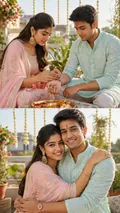
Rakhi Tying
Two panels: the rakhi going on, and the celebration immediately after.
works from two photos, one for each person, Options: Outfit, Setting, Greeting.
Use the two attached photos, the sister's and the brother's, to make a vertical 9:16 image in two stacked panels.
Get the AI prompt for Rakhi Tying
- Copy the prompt
- Open your AI app
- Attach your photo and send
Use the two attached photos, the sister's and the brother's, to make a vertical 9:16 image in two stacked panels. Top: the sister ties a rakhi on her brother's outstretched wrist, both heads bent toward their hands. Bottom: the moment after, a warm hug and a laddoo shared. Each keeps their own face and features. They wear [traditional Indian festive wear] in coordinated colours, in [a warmly decorated living room with a marigold toran and fairy lights], with a thali, a lit diya and sweets. Write [Happy Raksha Bandhan] across the bottom, spelled exactly.
Prefer one tap with no pasting, and your face kept the same? Use the app.

Sibling Bond Portrait
Just the two of you, close and entirely unbothered by the camera.
works from one photo, Options: Outfit, Setting, Mood.
Make a close sibling portrait from my attached photo of the two of us, standing with heads tilted together, one arm around the other's shoulder, a rakhi on the wrist.
Get the AI prompt for Sibling Bond Portrait
- Copy the prompt
- Open your AI app
- Attach your photo and send
Make a close sibling portrait from my attached photo of the two of us, standing with heads tilted together, one arm around the other's shoulder, a rakhi on the wrist. Our faces stay exactly as photographed, one caught mid-laugh while the other smiles at them. We wear [traditional Indian festive wear], in [a warmly decorated living room with a marigold toran and fairy lights]. Mood: [warm and nostalgic]. Soft golden light, flowers and fairy lights blurred behind, a 50mm look. Vertical 9:16, keep exactly the two of us.
Prefer one tap with no pasting, and your face kept the same? Use the app.
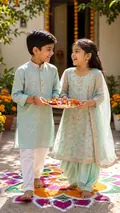
Brother-Sister Celebration
Siblings mid-laugh over a plate of sweets and a pile of rakhis.
works from one photo, Options: Outfit, Setting, Festive prop.
Turn the attached photo of the siblings into a joyful Raksha Bandhan scene: they are mid-laugh together, one reaching for sweets while the other tugs a sleeve, sharing [a big box of mithai being opened together].
Get the AI prompt for Brother-Sister Celebration
- Copy the prompt
- Open your AI app
- Attach your photo and send
Turn the attached photo of the siblings into a joyful Raksha Bandhan scene: they are mid-laugh together, one reaching for sweets while the other tugs a sleeve, sharing [a big box of mithai being opened together]. Keep each child's face and features exactly as photographed, and the children simply and age-appropriately dressed in [traditional Indian festive wear]. Setting: [a warmly decorated living room with a marigold toran and fairy lights], with rakhis, diyas and flowers around. Warm natural light, candid fun. Vertical 9:16, no one added or removed.
Prefer one tap with no pasting, and your face kept the same? Use the app.
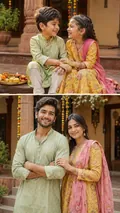
Then & Now Siblings
The two of you as children, and the two of you now, side by side.
works from two photos, one for each person, Options: Outfit, Scene, Mood.
From the two attached photos of the siblings, create a vertical 9:16 image with two stacked panels.
Get the AI prompt for Then & Now Siblings
- Copy the prompt
- Open your AI app
- Attach your photo and send
From the two attached photos of the siblings, create a vertical 9:16 image with two stacked panels. The top panel shows them as young children, the bottom shows them as they are today, both people recognisable as the same two individuals with their own faces carrying through both ages. Same pose in each: arms around each other's shoulders, giggling as kids and smiling warmly as adults. Setting: [the same family living room], with a rakhi on each wrist and sweets nearby. Mood: [warm and nostalgic]. Soft golden light, wholesome and natural.
Prefer one tap with no pasting, and your face kept the same? Use the app.
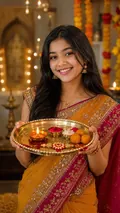
Rakhi Thali Portrait
The decorated thali held up in warm festive light.
works from one photo, Options: Thali style, Outfit, Greeting.
Create a Raksha Bandhan portrait from my attached photo: I hold up a decorated thali, [a traditional brass one with a lit diya, roli, rice, sweets and a silk-thread rakhi], at chest height, looking warmly at the camera.
Get the AI prompt for Rakhi Thali Portrait
- Copy the prompt
- Open your AI app
- Attach your photo and send
Create a Raksha Bandhan portrait from my attached photo: I hold up a decorated thali, [a traditional brass one with a lit diya, roli, rice, sweets and a silk-thread rakhi], at chest height, looking warmly at the camera. I wear [an embroidered saree, or a sherwani, whichever suits me]. My face stays exactly as photographed. Warm festive light from the diya on my face and hands, marigold flowers and fairy lights softly blurred behind, an 85mm lens feel. Vertical 9:16, with [Happy Raksha Bandhan] written in clean lettering, spelled exactly.
Prefer one tap with no pasting, and your face kept the same? Use the app.
How to use these prompts in Gemini (Nano Banana) or ChatGPT
- Pick a prompt above and tap Copy prompt, or Open in Gemini to copy and open it in one go.
- In Gemini or ChatGPT, attach a clear photo of your face (or of everyone in the picture).
- Paste the prompt, fill in anything in [brackets], and send.
- Not quite right? Reply with one change, such as "warmer light" or "keep my face exactly the same".
From selfie to Raksha Bandhan in three taps
Pick a style
Choose a look from the Raksha Bandhan collection above. No editing skill needed.
Upload a photo
Add a clear, well-lit selfie. It is used only to make your image and is deleted afterward.
Generate and share
Your AI photo is ready in seconds to download or share anywhere.
Tips for the best result
For the two-photo styles use one clear, front-facing photo of each sibling so both faces stay sharp in the result.
Raksha Bandhan: photos, prompts and plans explained
How do I make a photo from the Raksha Bandhan collection?
Open the Trendy AI Lab app, pick a style from the Raksha Bandhan collection, upload a photo, and the app generates your image in seconds. You can then download or share it.
What photo works best for Raksha Bandhan?
For the two-photo styles use one clear, front-facing photo of each sibling so both faces stay sharp in the result.
Is Trendy AI Lab free?
The prompt for every style is free: copy it into ChatGPT or Gemini. Making the image in the app, with your face kept the same, needs a weekly or monthly plan, and the browser image tools are free with no account.
Which platforms is it available on?
The image tools work in any browser, on phone or desktop. The AI trends are in the Android app, with the iOS version coming soon.
How is my photo used?
Your photo is sent to a third-party AI service only to generate your image, and the upload is deleted afterwards. It is never used for advertising.
Make yours from the Raksha Bandhan collection
Copy a free prompt for any style here, or make it with your own face in the Trendy AI Lab app.

 Coming soon